

Ever felt lost in a sea of tech jargon? You’re trying to grow your business, and suddenly you’re dealing with terms like SEO, algorithms, and URLs. It can be overwhelming. But what if you could understand exactly what a URL is, how its parts work, and why a good one is critical for boosting your business’s local SEO? This guide will show you just that—no technical degree required.
Let’s cut through the noise. A URL is the unique address for any page on the internet. Think of it like a street address for a house, but for a specific piece of content on the web. When you type an address into your GPS, it takes you to one specific location. A URL does the same thing for your web browser, taking you to one specific page, image, or file online.
The term URL stands for Uniform Resource Locator. While that sounds complicated, just remember it’s the unique address that helps browsers and search engines like Google find your content.
Every web address you see is made of a few key components. Let’s break down an example like https://magicbolt.in/blog to see how it works.
(An annotated image here would visually break down a URL into these three parts: Protocol, Domain Name, and Path.)
URLs are not just for browsers; they are a key signal for search engines like Google. When someone searches for a service you offer, Google looks at countless factors to decide who ranks first. A clear, well-structured URL is a simple but powerful way to tell Google exactly what your page is about, helping you rank higher and attract more customers.
Think of your URL as your website’s first impression. Clean, descriptive URLs help Google categorize your content faster and more accurately. For example, a URL like /services/local-seo-packages is instantly understandable. In contrast, a messy URL like /p?id=123 is confusing for both search engines and users. A clear structure builds trust and signals that your website is professional and well-organized.
This same logic applies to your most important local SEO asset: your Google Business Profile (GBP). Your GBP has a unique URL that customers use to find you on Google Maps, read reviews, and get directions. Ensuring your business information is consistent across the web, starting with your core website URLs, strengthens your local SEO signals and makes it easier for customers to find you. Need to boost your GBP? See how MagicBolt automates it.
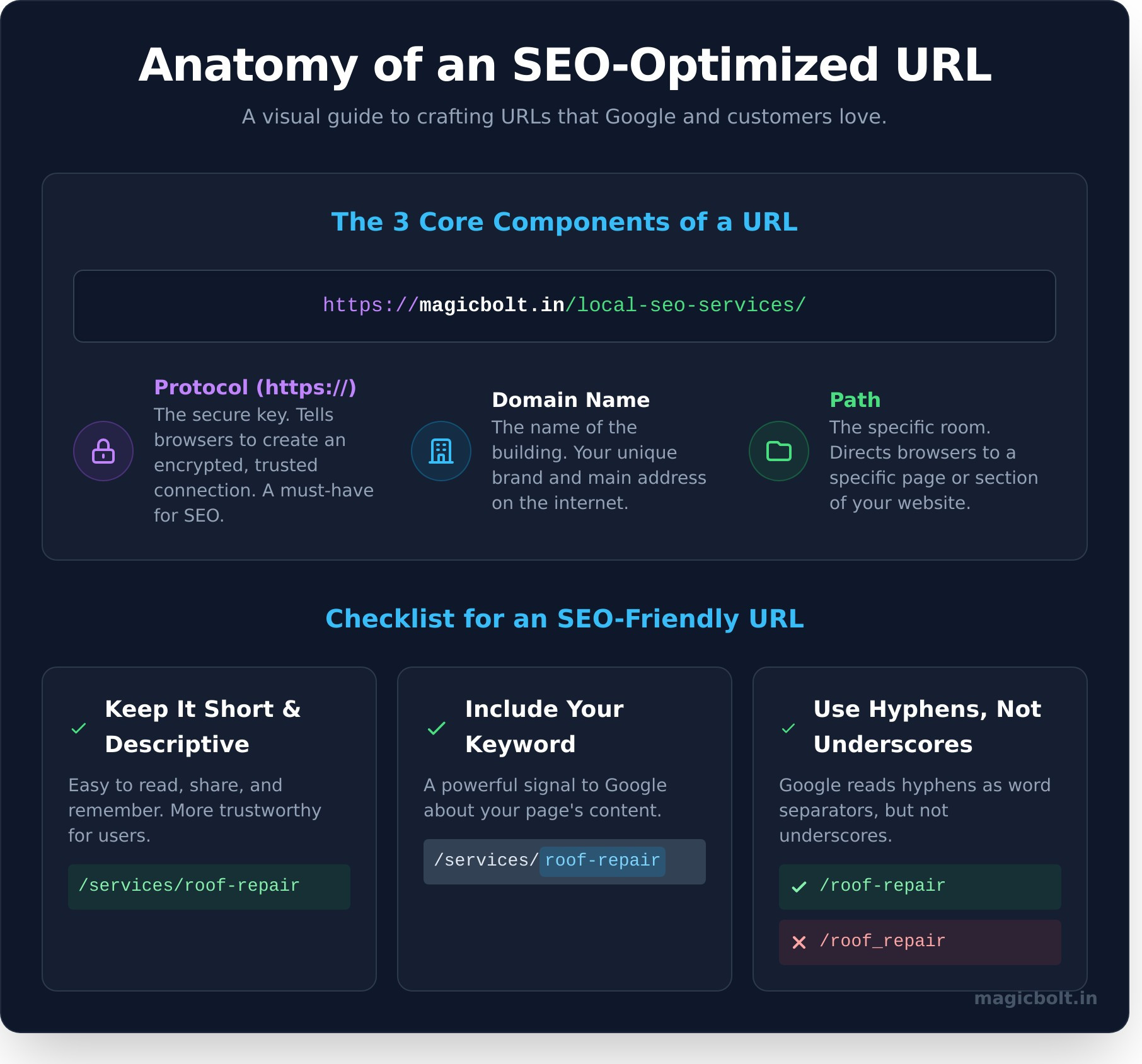
The good news is you don’t need to be a tech expert to create great URLs. By following a few simple rules for every page you create on your website, you can give your SEO a significant boost.
Shorter URLs are easier for users to read, copy, and share on social media. Instead of a long, rambling URL, aim for clarity and conciseness. A short, descriptive URL is more memorable and looks more trustworthy in search results.
One of the most effective SEO tactics is to place your page’s main target keyword directly in the URL. If your page is about “emergency plumbing services,” your URL should reflect that (e.g., /services/emergency-plumbing). This is a direct and powerful signal to Google about the page’s content.
Always use hyphens (-) to separate words in your URL. Google’s algorithm is built to recognize hyphens as word separators, making it easy to read your keywords. It does not treat underscores (_) the same way, which can cause your keywords to be mashed together and misunderstood.
A domain name is the main part of your website’s address, like “magicbolt.in”. A URL is the full address to a specific page, including the protocol and path, like “https://magicbolt.in/pricing”. The domain is the building; the URL is the address to a specific apartment inside.
The ‘s’ in “https” stands for “secure.” It means the connection between your browser and the website is encrypted, protecting sensitive information like passwords and credit card details. Google prioritizes secure websites, making HTTPS a crucial ranking factor.
Yes, but you should do it carefully. Changing a URL is like moving to a new address. You must set up a “301 redirect” to automatically forward visitors and search engines from the old URL to the new one. Without a redirect, you will lose all the SEO value and traffic associated with the old link.
Simply visit the page you want the URL for and look at the address bar at the top of your web browser. You can click on the address bar to highlight the full URL, then copy and paste it as needed.
Understanding URLs isn’t about becoming a web developer; it’s about taking control of a small but vital piece of your online presence. By creating clear, keyword-rich URLs, you’re sending the right signals to Google and making it easier for customers to find you. It’s a simple step that can have a huge impact on your visibility and growth. Ready to dominate local search? Start your free MagicBolt trial!

Made in India
